
The golf shop resource library
Using historical sales to plan your next golf shop buy
Historical sales show what your shop actually sold. Start with a detailed export directly from your POS, keeping the product information your shop already uses. More relevant detail gives MERCHED more context for your buying plan; projections, budgets, and sales targets need to remain separate from the actual results.
The starting pointExport actual sales from your POS with as much detail as possible. Keep the original file, confirm its reporting period, and review the fields before importing.
MERCHED builds this plan from your shop’s own sales history. See the merchandise planning software
01
Choose history that matches the decision
Match the comparison to the planning season. A full calendar year may hide the spring opening demand you need to understand. Compare similar selling windows and annotate differences in operating days, course closures, events, and customer mix before applying a growth assumption.
Where available, review more than one comparable season to distinguish a recurring pattern from an unusual year. Do not average away a known change such as a new women’s program or a renovated shop. Preserve both the historical result and your explanation for adjusting it.
02
Export the detail your POS already holds
Download your sales report directly from the POS whenever possible. Keep existing SKUs, style numbers, product names, brands, categories, departments, sizes, and descriptions. You do not need to rename everything or rebuild a simpler spreadsheet for MERCHED. Preserve an untouched copy so you can check any interpretation against the source.
Aim for at least two full years of actual sales and retain the reporting dates. More product detail helps explain what sold; more rows are only useful if they add real evidence rather than repeat the same sales. CSV, TSV, TXT, and XLSX files are supported for sales uploads.
Units and revenue answer different questions. Units help explain depth and size demand; revenue reflects both quantity and realized selling price. Review cost and markdown context separately where available rather than assuming a high-revenue category was also the strongest margin contributor.
- Keep quantity sold and the correct reporting period clear.
- Include category, brand, product or SKU, and size when available.
- Retain revenue, selling price, and transaction dates when the report provides them.
- Identify event sales, returns, and discounts so their treatment is clear during review.
03
Separate actual sales from projections and targets
A workbook may contain actual sales beside a budget, a year-end projection, and a proposed buy. Only the actual results describe historical performance. Keep the other figures available as separate planning context; do not map them into actual units sold or sales revenue.
Check the meaning of each column and reporting period, not just whether a value looks plausible. Year-to-date sales are a partial period, while a projected full year includes an assumption about sales that have not happened. If the heading is unclear, confirm it with the report owner before importing.
04
Check the report before confirming the import
A category summary and its product-detail rows can describe the same sales. For each reporting period, use one consistent level of evidence so the total is counted once. The same applies when monthly exports overlap an annual report or an updated file repeats an earlier upload.
Review quantity and revenue separately, along with the source’s treatment of returns and discounts. Confirm category mappings, dates, and any missing or inferred values before relying on the import. A missing size is unknown evidence, not proof that an apparel product is one-size.
- Choose the sales file and confirm which rows or sheets contain actual results.
- Review the quantity mapping, period, and product fields; keep forecasts and targets out of actual-sales fields.
- Check for repeated totals, overlapping periods, unclear returns, and rows flagged for attention.
- Confirm the import only when the selected evidence agrees with the source report; use MERCHED Help if anything is unclear.
05
Read category, brand, and size results in context
Start with the category, then review the brands and products within it. Look at whether growth came from more units, higher prices, a longer selling window, or deeper stock. A brand with lower sales may have arrived late or lacked key sizes; a bestseller may have benefited from heavy discounting.
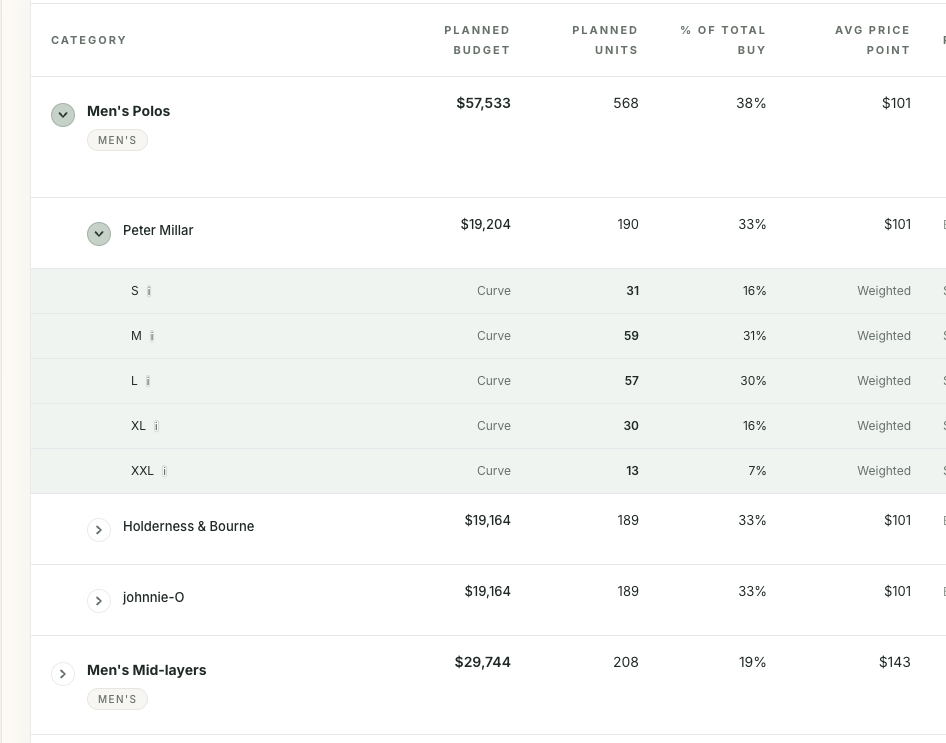
Use size history within relevant apparel groups. Men’s polo sizes should not be treated as a universal curve for women’s tops, bottoms, or footwear. If medium sold out early, recorded medium sales may understate demand. A size percentage is most useful when you also understand availability and the amount of evidence behind it.
06
Turn the evidence into a reviewable assumption
Write down the baseline, the adjustment, and the reason. For example: retain the core polo business, test more depth in proven women’s styles, and reduce a gifting line that relied on one event. Separate the demand outlook from the quantity still needed after usable stock and commitments are considered.
When history is incomplete, narrow the conclusion. Category totals can support an initial category discussion, but they cannot establish a reliable product or size curve. Make assumptions visible and review them as better evidence becomes available.
Use these assumptions to build the complete seasonal merchandise plan.
From process to practice
Where MERCHED fits
MERCHED uses uploaded sales and order history alongside shop-specific inputs to build merchandise recommendations for golf shops. Sales imports require a mapped quantity field; category, brand, product, and size detail add context when available. Review inferred categories and missing information during upload. Recommendations provide a data-backed starting point, and the merchandiser controls the final plan. MERCHED does not pull a live POS feed or provide live inventory management.
Explore our merchandise planning software, see How It Works, or read Built for Golf for the shop-specific inputs behind the recommendation.
Questions from the shop
Frequently asked questions
How much sales history do I need?
Aim to upload at least two full years of actual sales, exported directly from your POS with as much product detail as possible. Planning from sales history alone requires data from at least two years. When sales history is limited, uploaded order or inventory data can also support a plan, with more assumptions to review. A file being accepted for upload does not mean every planning requirement has been met.
Can I plan if my report has no size detail?
Yes, category and brand totals can still support planning at those levels. Missing size history means size guidance relies more on assumptions and needs closer buyer review. Do not present an estimated curve as measured member demand.
Does MERCHED connect directly to my POS in real time?
No. This workflow uses uploaded data. Export the relevant information from your source system and review its reporting period and mappings when uploading. A new export is needed when you want more recent evidence considered.
Bring more structure to your next buy.
Build on your shop’s history with every season you plan. Give MERCHED more context, review the recommendation, and make the final plan your own.
Get Started